Break-in alerts
Know when someone guessed at your vault, and see who it was
With Break-In Alerts and Capture Photo on, the wrong try that starts a wait makes Sealed take three front-camera photos about three and a half seconds apart, and the screen flashes white to light the first one. A break-in photo is encrypted like everything else and opens only after you unlock, and the location saved with it never leaves the phone. Break-in alerts are off until you turn them on, and the photo also needs camera permission. Break-in alerts are part of Sealed Pro.

On this page
Switch it on
- Open Sealed’s Settings and tap Break-In Report.
- Turn on Break-In Alerts. Break-in alerts are part of Sealed Pro.
- Turn on Capture Photo and allow the camera when iOS asks.
- Turn on Record Location if you want a place with the photos, and allow location when asked.
- Set how many wrong tries in a row start the wait and the photos. Unless you change the limit, the first wait starts at the third wrong try in a row.
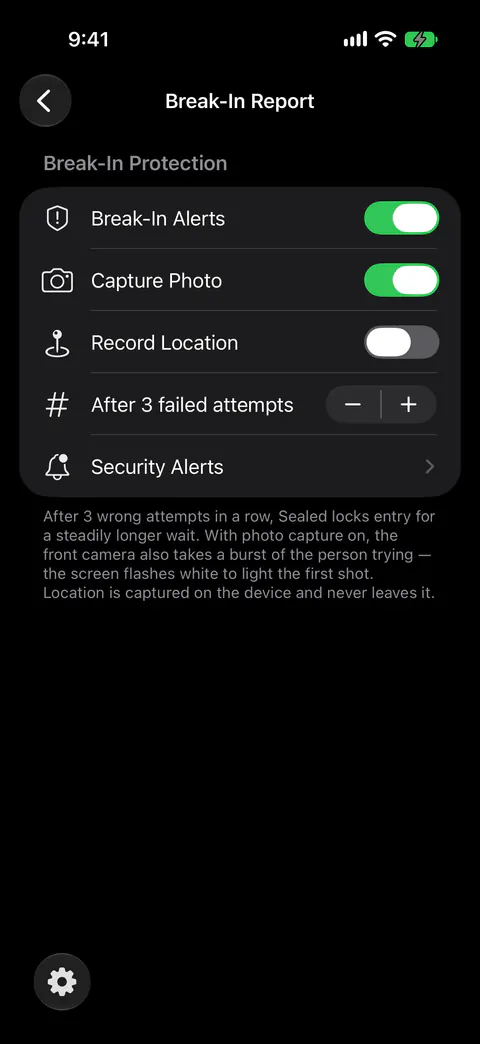
If a switch flips back off by itself, iOS was not given the permission it asked for. In iOS you can turn an app’s camera access on or off in Settings, under Privacy & Security, then Camera. In iOS you can review or change an app’s location access in Settings, under Privacy & Security, then Location Services.
What the person guessing sees
They type a wrong passcode, then another. Each one is refused, and nothing more happens until the limit you set. A Face ID or Touch ID attempt that doesn’t match counts as a wrong try, but cancelling the prompt, or iOS cancelling it, does not.
At the limit, the camera wakes. With Break-In Alerts and Capture Photo on, the wrong try that starts a wait makes Sealed take three front-camera photos about three and a half seconds apart, and the screen flashes white to light the first one. The screen flashes white only when a photo is about to be taken, and then turns black and shows the countdown.
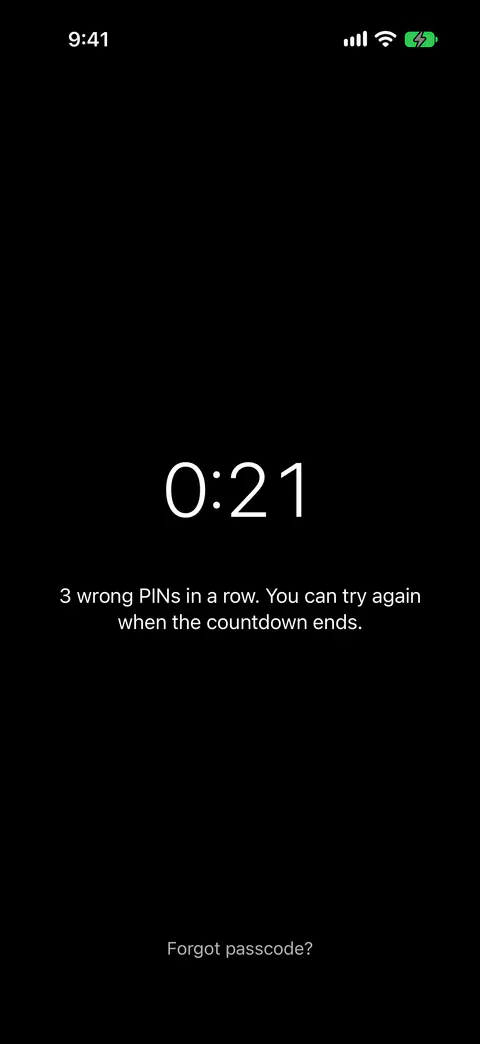
During a wait Sealed refuses every way in, the right passcode and Face ID included, and doesn’t count those tries as wrong. Each further wrong try makes the next wait longer:
- The wrong try that reaches the limit starts a wait of 30 seconds.
- The next wrong try starts a wait of 1 minute.
- The wrong try after that starts a wait of 5 minutes.
- The wrong try after that starts a wait of 15 minutes.
- Every wrong try after that starts a wait of 60 minutes.
Sealed keeps the wrong-try count and the wait when you close it and open it again, and the count clears only after a correct unlock or a passcode reset with your recovery key. The effect on someone trying many codes is worked out in how long a passcode takes to guess.
If it was you who forgot the code: Forgot passcode? with your recovery key works during a wait, because a wait protects nothing against a 256-bit key.
Reading the report
- Unlock Sealed with your real passcode.
- Go to Settings, then Break-In Report, then Security Alerts.
- Tap a photo to see it full size. Tap the location to open it in Apple Maps.
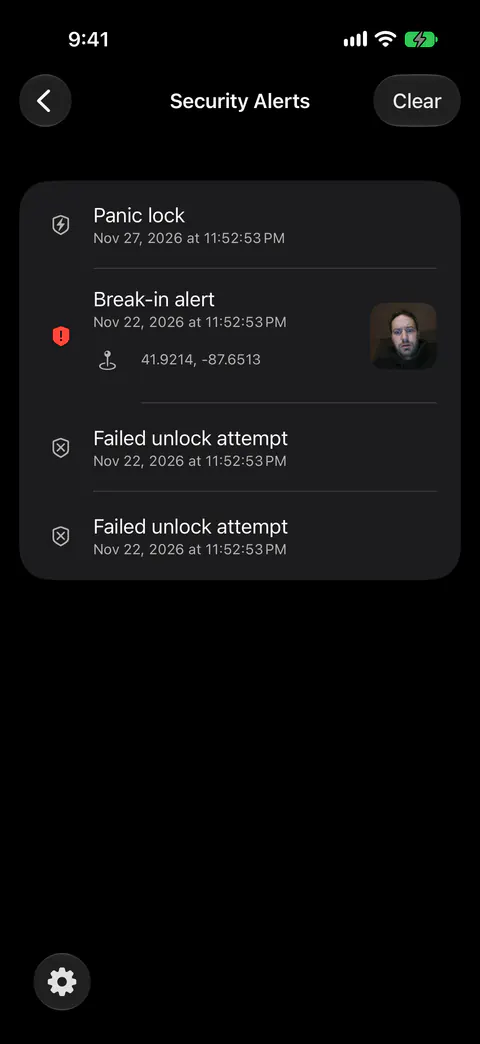
Once Break-In Alerts is on, Settings, under Break-In Report, has a Security Alerts list with each break-in alert, its photo and its location, and tapping the location opens Apple Maps. While Break-In Alerts is on, every wrong try is saved as a failed unlock attempt with its date and time.
When you are done with them: Anyone who can open your real vault can clear the alerts and their photos, after one confirmation, and it can’t be undone.
Where the evidence is kept
A break-in photo is encrypted with your vault key like any vault file, and its location is sealed with a second key that Sealed can read while the vault is locked, because the fix is saved at the moment of the attempt. Break-in photos and their locations stay on the iPhone: they are not part of your iCloud backup and never reach us.
When an alert has no photo or no place
- No photo. When no photo can be taken, the alert is still saved and says why, for example that photo capture is off or that the camera isn’t allowed.
- No place. Location may not have been allowed, or no fix came in time. Sealed takes one location fix for the whole burst, asks for about a hundred meters of accuracy, and leaves the location out if location isn’t allowed or no fix arrives within 8 seconds.
- No alert at all. The wrong tries may have stopped before the limit, or the code typed was the decoy. Typing the decoy passcode counts as a correct passcode: it adds no failed attempt and starts no wait or break-in photo.
Where Sealed helps, and where it doesn’t
It helps you learn after the fact that someone tried to get in, see what the front camera saw, and make each extra guess cost more time. Break-in alerts take a short burst of front-camera photos after wrong passcodes, and note where it happened.
It doesn’t do these things:
- Tell you as it happens. Sealed sends no notification when someone tries a wrong passcode: the only notifications it builds are the free-trial reminder, the day a time-sealed stack opens, the monthly checkup reminder and a finished photo check, and it has no push server of its own.
- Stay unnoticed. The white flash is visible on purpose, and Apple says iOS shows a green indicator whenever an app uses the camera.
- Photograph every wrong try. Photos come with the wait; earlier tries are listed with their time only.
- See past a covered lens. If the person turns the phone away, the photos show that.
- React to the right code. A watched passcode, or the decoy code, opens without an alert.
- Survive the phone being erased or lost. The alerts live only on this iPhone, as above.
Questions and answers
Will my phone notify me during a break-in attempt?
Sealed sends no notification when someone tries a wrong passcode: the only notifications it builds are the free-trial reminder, the day a time-sealed stack opens, the monthly checkup reminder and a finished photo check, and it has no push server of its own.
Do break-in photos go to iCloud?
Break-in photos and their locations stay on the iPhone: they are not part of your iCloud backup and never reach us.
Does the wait need break-in alerts to be on?
The wait is part of every vault: it doesn’t need Break-In Alerts or Sealed Pro.
Sources
What this page says about Sealed was checked against the app on .
- Sealed on the App Store — the listing, which names break-in alerts and the escalating wait
- Apple Support, Control access to hardware features on iPhone — camera permission, and the green indicator iOS shows when an app uses the camera
- Apple Support, Control the location information you share on iPhone — location permission for an app
Get Sealed
Sealed is free to download, and Sealed Pro is an optional in-app purchase.

Sealed: Private Photo Vault
Sealed is free to download, and Sealed Pro is an optional in-app purchase.