Decoy vault
A second passcode that opens a second, ordinary-looking vault
A decoy vault opens with a second passcode, and it is part of Sealed Pro. The decoy passcode opens a separate vault with its own content, and you fill it yourself: unlock with the decoy passcode and add items. Face ID and Touch ID always open your real vault: the decoy vault opens only with its own decoy passcode or decoy pattern. It gives a looker something believable to see; it can’t stop someone who knows to ask for the other code.

On this page
What you need first
- Sealed Pro. A decoy vault opens with a second passcode, and it is part of Sealed Pro.
- A passcode you already use. The decoy has to use the same passcode format as your real one and can’t be the same code, and if you change the format later the decoy is removed and you set it up again.
- A pattern, if you want a decoy pattern. Besides a decoy passcode, you can set a decoy pattern that opens the decoy vault, once you have a pattern of your own.
- A few minutes to fill it. An empty vault invites the question of where everything else is.
Turn on the decoy code
- To set up a decoy, open Settings, then Decoy Vault, and turn on Decoy PIN, which asks you to choose the decoy code.
- Type the decoy code, then type it again to confirm. It has to be a different code from your real one.
- If you also unlock with a pattern, tap Set Decoy Pattern on the same page and draw a pattern that is not your real one.
- Leave the page. The decoy is now live on the lock screen.
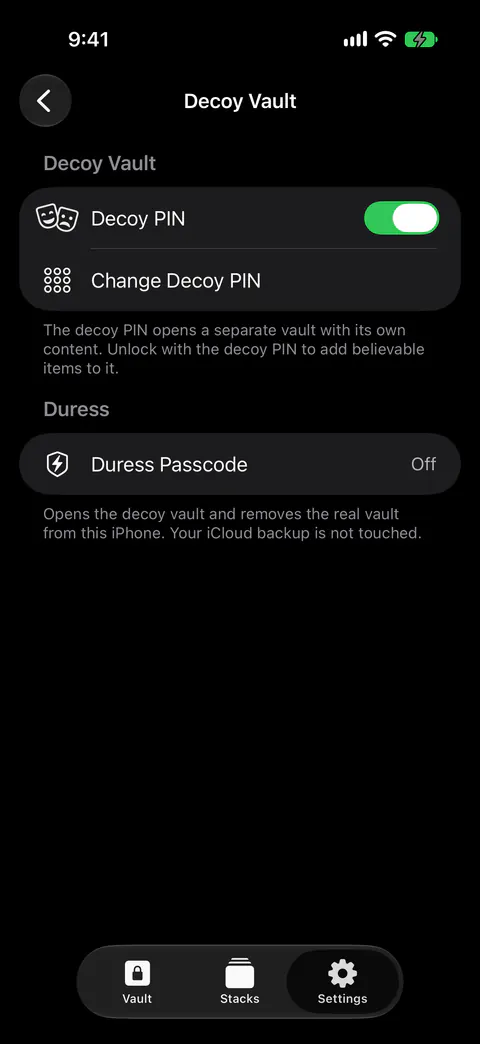
With the Cryptex or Knock as your lock screen, the decoy code is made on that lock’s own surface, as a word or a rhythm.
Fill it so it looks lived-in
- Lock Sealed with the lock button at the top of the vault.
- On the lock screen, enter the decoy code. The vault that opens is the decoy, and it starts empty.
- Add a few things a person would expect to find: some ordinary photos, a shopping list note, a loyalty card record.
- Lock again, and open with your real passcode to check your own vault is untouched.
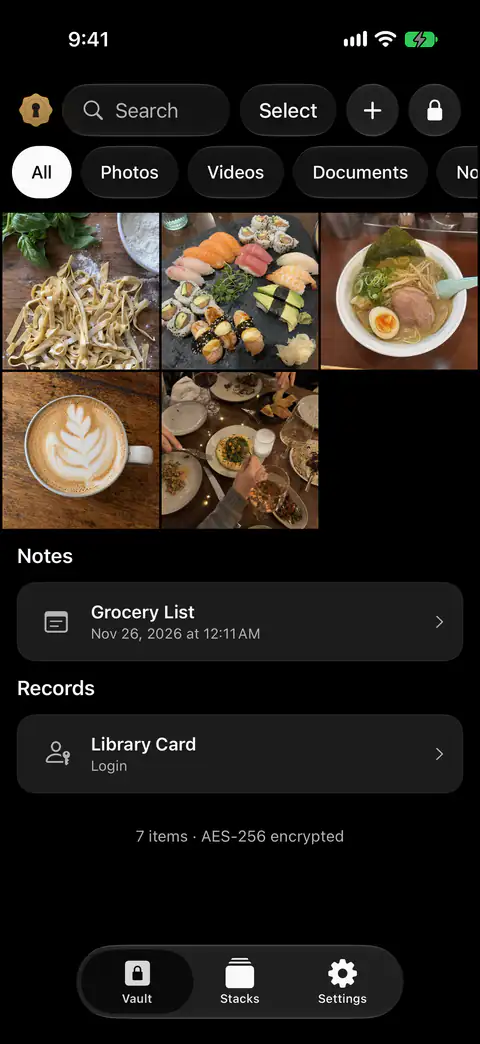
Anything added while the decoy vault is open, such as photos, files, notes, records, stacks and camera shots, is saved in the decoy vault and not in your real one.
While you are in it, Settings is shorter than usual. In the decoy vault, Settings leaves out your plan and iCloud backup, Location Lock, Break-In Report, Decoy Vault, Transfer and Data & Storage, and the vault home leaves out the backup status line. Settings a person changes while in the decoy vault work during that visit and are put back when the vault locks.
How it sits next to your other locks
| If you have… | With the decoy code |
|---|---|
| Face ID or Touch ID unlock | Face ID and Touch ID always open your real vault: the decoy vault opens only with its own decoy passcode or decoy pattern. |
| Dual Lock | With Dual Lock on, the decoy passcode opens the decoy vault without the Face ID step that your real passcode needs. |
| Maximum Security | With Maximum Security on, even the decoy passcode needs a live Face ID or Touch ID match, because the vault key is only released by one. |
| Break-in alerts | Typing the decoy passcode counts as a correct passcode: it adds no failed attempt and starts no wait or break-in photo. |
A duress passcode builds on the decoy. A duress passcode or duress pattern opens your decoy vault and, at the same moment, removes your real vault from this iPhone.
If it doesn’t behave as expected
- Your face opened the real vault, not the decoy. That is by design: see the table above. If you depend on the decoy, consider turning face unlock off. In Settings, under Passcode & Unlock, you can turn Face ID or Touch ID Unlock off, and set, change or remove a pattern.
- The decoy code stopped working after you changed your passcode. A change of format, say from digits to a password, removes it, as noted at the top. Set a new one.
- The decoy is missing on a new iPhone. Passcodes stay on the phone where they were made, so set it up again and refill it.
- Photos you shared to Sealed from another app are not in the decoy. Files from the share sheet or the USB drop box are brought in only while your real vault is open, never in the decoy vault.
Where Sealed helps, and where it doesn’t
It helps when someone asks to look inside Sealed and you would rather they saw an ordinary vault than your own. The decoy passcode opens a separate vault with its own content, and you fill it yourself: unlock with the decoy passcode and add items.
It doesn’t do these things:
- Fool someone who knows the feature exists. The decoy vault is described on the App Store page and here, so a person who has read about it can ask for the other code.
- Act as a second encrypted store. Decoy items are kept in the same database as your real items, marked by a flag, and the decoy vault opens with the same vault key, so it is a filtered view and not a second encrypted store. Someone with deep access to the phone’s storage is a different threat, covered on the security page.
- Look identical everywhere. A person who knows the full Settings list may notice what the decoy’s list leaves out.
- Tell you it was used. Break-in alerts record wrong tries, and the decoy code counts as a right one.
- Come along in your backup. Items in the decoy vault are not part of your iCloud backup. The guide to decoy vaults covers what to check before relying on one.
Questions and answers
Can I use a pattern for the decoy?
Besides a decoy passcode, you can set a decoy pattern that opens the decoy vault, once you have a pattern of your own.
Will the decoy be on my new iPhone after a restore?
Your passcodes, the decoy one included, stay on the iPhone where you made them, so a new iPhone starts without a decoy. Items in the decoy vault are not part of your iCloud backup.
Is the decoy vault encrypted separately?
Decoy items are kept in the same database as your real items, marked by a flag, and the decoy vault opens with the same vault key, so it is a filtered view and not a second encrypted store.
Sources
What this page says about Sealed was checked against the app on .
- Sealed on the App Store — the listing, which names the decoy vault
Get Sealed
Sealed is free to download, and Sealed Pro is an optional in-app purchase.

Sealed: Private Photo Vault
Sealed is free to download, and Sealed Pro is an optional in-app purchase.