Free plan
Start a photo vault for free, and know where the line is
The free plan holds up to 100 photos. On the free plan you can add photos. Videos, documents, notes and records need Sealed Pro. Encrypted iCloud backup is free. There is no time limit and no account to make.

On this page
Set up a free vault in five steps
You can go from installing Sealed to a backed-up vault of photos without paying and without signing up for anything. Sealed has no account, so there is nothing to sign up for.
- Install Sealed and choose a passcode. Sealed’s default passcode is 6 digits, and you can choose 4 or 9 digits or a password instead. You can add Face ID or Touch ID on the next screen; both are on the free plan.
- Save the recovery key when Sealed shows it. Write it down or store it where you keep important papers. The recovery key is the only way to decrypt an iCloud backup on a new iPhone.
- Let backup start. The first time you save your recovery key, Sealed also turns on iCloud Backup, which is free. You don’t need to find a switch for it.
- Add photos. Tap the plus button at the top of the vault and choose Photos, then pick the pictures you want. Sealed imports only the photos and videos you choose, and deletes the originals in Photos only when you ask.
- Decide about the originals. After you import photos, Sealed asks whether to delete the originals from Photos or keep them, and says that deleted originals move to Recently Deleted in Photos.
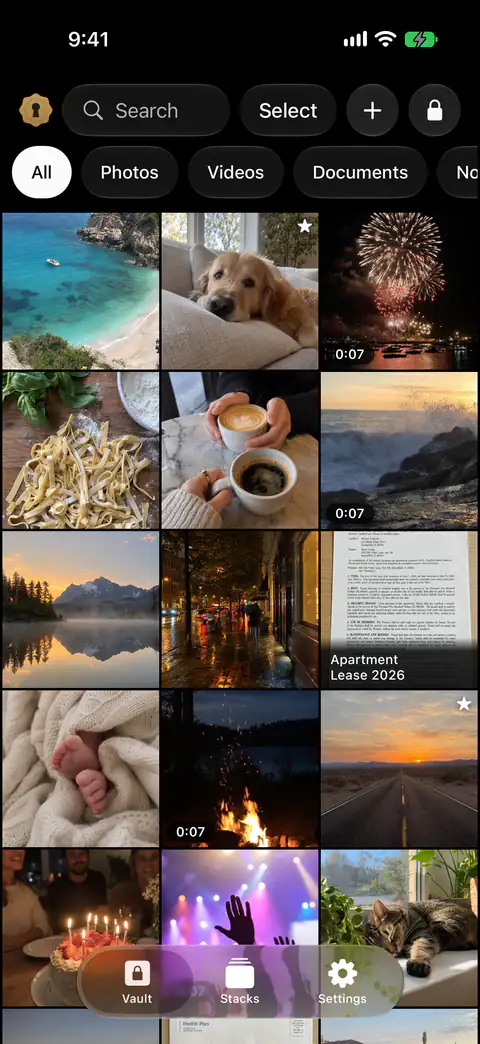
If you skip a step, nothing is lost. The recovery key page shows where to find the key again later, and backup can be turned on from Settings at any time.
What you can keep for free
- Photos, up to 100 of them.
- Stacks to sort them, with a cap on nesting. On the free plan you can make up to 3 sub-stacks, and Sealed Pro has no limit.
- Edits to your photos. The photo editor is free, video trimming is part of Sealed Pro, and both work without anything leaving the vault.
- A way to find photos worth sealing. Find Private Photos is free, and the photos it seals follow the same free-plan rules as any import.
The recovery key and key guardians are free for everyone. The Security Checkup is free for everyone.
What waits for Sealed Pro is everything that is not a photo. On the free plan you can add photos. Videos, documents, notes and records need Sealed Pro.
Other ways photos get in
The plus button is not the only door. These also work on the free plan, and each one follows the same limit:
- From another app’s share sheet. Sealed appears in the share sheet of other apps, and what you share to it is saved and then sealed into your vault the next time you unlock Sealed.
- From a Mac over a cable. A USB drop box folder shows up in Finder when you connect your iPhone to a Mac, and it is free.
- With Shortcuts or Back Tap. Seal Last Screenshot and Seal Last Photo take photos only, work on the free plan, and count toward the free plan’s limit when they reach the vault.
When the vault is full
On the free plan, a pick that would take the vault past its limit is refused whole, so nothing is half-imported: Sealed says the free plan holds 100 items and opens the Sealed Pro page. Items in Recently Deleted don’t count toward the free plan’s limit.
Photos arriving by the other routes are not thrown away:
- On the free plan, files that come in through the share sheet or the USB drop box follow the free rules: photos only, while the vault has room, and the rest wait with a message.
- If a free vault is full, photos taken this way wait, sealed, until it has room, and none of them go to Photos.
To make room, delete photos you no longer need. Recently Deleted keeps anything you remove for 30 days before it is gone for good.
Backup is on the free side of the line
Losing a vault is a bigger risk for most people than someone opening it. That is why backup is not a Pro feature.
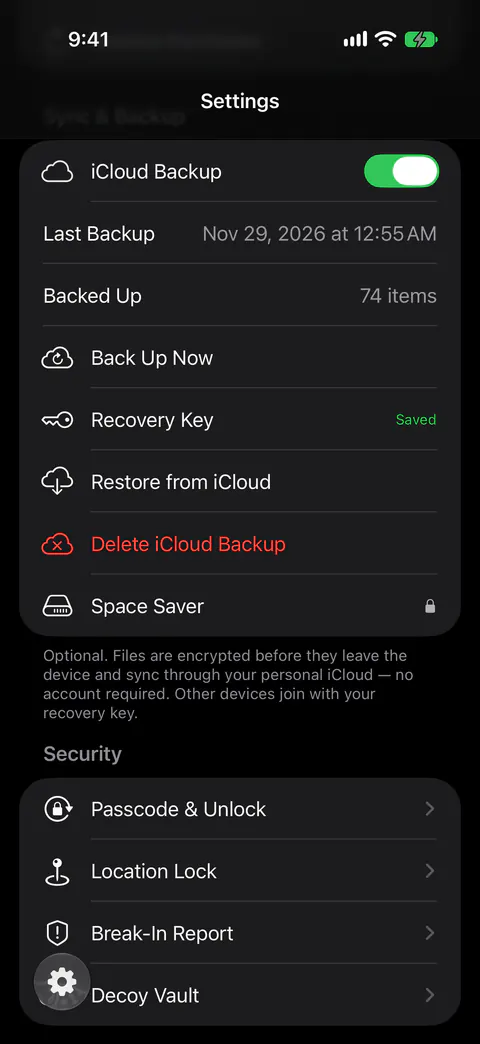
Encrypted iCloud backup is free.
The one backup-related tool that needs Pro is Space Saver, which is about room on your iPhone rather than safety. Space Saver, part of Sealed Pro, keeps originals in your encrypted iCloud backup and frees space on your iPhone.
Leaving, or moving up later
If you stop using Sealed, you can take everything out first. Viewing and exporting your own photos is always free. The export guide walks through it.
If you move to Pro, you keep the same vault: the same photos, the same recovery key, the same backup. The Sealed Pro page compares the three plans. Should a plan end later, If your Sealed Pro plan ends, backup keeps running.
Where Sealed helps, and where it doesn’t
It helps if you want a modest collection of photos sealed on your iPhone, backed up and recoverable on a new phone, with no ads and no account. Sealed has no ads and no tracking.
It doesn’t do these things on the free plan:
- Keep videos, scans, notes or records. On the free plan you can add photos. Videos, documents, notes and records need Sealed Pro.
- Offer the extra locks, such as a decoy vault or break-in photos. Those are listed on the Sealed Pro page.
- Free up storage on your iPhone. That is Space Saver, a Pro tool.
- Remove the originals by itself. Until you delete them, the originals stay in Photos, outside the vault. The guide to moving photos into a vault covers clearing them from Photos.
Questions and answers
Does the free plan run out after a trial period?
No. Sealed is free to download, and Sealed Pro is an optional in-app purchase. The free plan holds up to 100 photos.
Will my photos be held back if I never upgrade?
Viewing and exporting your own photos is always free. Only taking files off your iPhone is part of Sealed Pro: bringing files back from iCloud never is, even if your plan ends.
Is the encryption weaker on the free plan?
No. Sealed encrypts every file with AES-256-GCM before it is saved. Each file gets its own random 256-bit key, and that key is sealed with your vault key.
Sources
What this page says about Sealed was checked against the app on .
- Sealed on the App Store — the listing, which describes the free plan and Sealed Pro
Get Sealed
Sealed is free to download, and Sealed Pro is an optional in-app purchase.

Sealed: Private Photo Vault
Sealed is free to download, and Sealed Pro is an optional in-app purchase.