Guide
Are your iPhone photos encrypted? On the phone, in iCloud and in backups
Yes. Apple says all data on an iPhone is stored encrypted once you set a passcode, photos included. In iCloud Photos they are encrypted too, but by default Apple keeps the keys, so it can decrypt them. Turning on Advanced Data Protection makes iCloud Photos end-to-end encrypted, with the keys on your devices. None of this stops someone who unlocks your phone: encryption protects a locked or lost phone, not an open one.

On this page
The short answer, layer by layer
Your photos usually exist in up to three places: on the phone, in iCloud Photos, and in a backup. Each has its own rule.
| Where the photo is | Encrypted? | Who can decrypt it |
|---|---|---|
| On the iPhone, phone locked | Yes | Nobody without the passcode |
| On the iPhone, phone unlocked | Yes, but iOS opens it | Whoever is holding the phone |
| iCloud Photos, standard protection (default) | Yes | You, and Apple |
| iCloud Photos, Advanced Data Protection | End-to-end | Only your trusted devices |
| Computer backup, default | No | Anyone with the file |
| Computer backup, Encrypt local backup on | Yes | Anyone with its password |
The rest of this page explains each row and the one setting per row that changes it.
On the phone: encrypted, as long as there is a passcode
Apple’s security guide says all data on an iPhone is stored in encrypted form, and that setting a passcode turns on Data Protection. Apple names Photos among the apps that use it by default, with a separate key for each new file.
What that means in practice: a phone that is off, or locked, keeps its photos sealed against someone who takes it. Once you unlock it, iOS decrypts photos for whoever is holding it. Encryption at this layer answers “what if my phone is stolen?”, not “what if someone picks up my open phone?”.
What to do: use a six-digit or longer passcode, not a four-digit one. To change your iPhone passcode, go to Settings, then Face ID & Passcode (Touch ID & Passcode on some models), and tap Change Passcode.
In iCloud: encrypted, but who holds the key matters
If iCloud Photos is on, every photo is uploaded. With iCloud Photos on, every photo and video you take is uploaded to iCloud automatically. Apple’s iCloud data security overview gives two levels.
- Standard data protection is the default. By default, Apple keeps the encryption keys for iCloud Photos, Notes and iCloud Drive in its own data centers so that it can help you recover them, and only the optional Advanced Data Protection makes them end-to-end encrypted. Under standard data protection, Apple can decrypt your iCloud data on your behalf, for example when you sign in on a new device or recover your data after forgetting your password.
- Advanced Data Protection makes iCloud Photos end-to-end encrypted: the keys stay on your trusted devices and Apple can’t decrypt them.
Two things stay outside even with it on. Even with Advanced Data Protection on, Apple keeps the keys to some Photos metadata, such as each photo’s checksum, whether it is marked as a favorite, set aside or deleted, and how many times it has been viewed. Shared Albums in Photos don’t support Advanced Data Protection, so what you share in one is not end-to-end encrypted even when Advanced Data Protection is on.
To turn it on (Apple’s steps): To turn on Advanced Data Protection on an iPhone, open Settings, tap your name, then iCloud, scroll down, tap Advanced Data Protection and then Turn on Advanced Data Protection.
Before you do, know the trade. Advanced Data Protection needs an Apple Account with two-factor authentication, a passcode or password on your device, and updated software on every device signed in to your account. Before Advanced Data Protection turns on, Apple has you set up at least one recovery method, a recovery contact or a recovery key, because with it on Apple doesn’t have the keys to help you recover your end-to-end encrypted data. If you lose access to your account and your recovery methods, Apple can’t bring your photos back.
The Hidden album is a lock, not extra encryption
Many people move a photo to the Hidden album thinking it gets stronger protection. Apple’s article describes a lock on viewing. Photos you move out of the Library into Apple’s separate locked album stay out of the Library, other albums and the Photos widget, and from iOS 16 that album asks for authentication to open. From iOS 16, Photos keeps its album for set-aside photos, and Recently Deleted, locked by default: they open with Face ID, Touch ID or your iPhone passcode.
The photo stays in the same library, under the same encryption as every other photo. The album opens with the phone’s own Face ID or passcode, the lock can be switched off in Settings, and an app with full photo access can read it. Apple says that giving an app full access to your photos grants it your photos and videos, including the ones in the Hidden album even if that album is locked.
Backups: the copy people forget
Apple says iCloud backups are always encrypted, while a backup on your computer is encrypted only if you turn that option on. A backup on a Mac or PC isn’t encrypted by default. A backup on a computer isn’t encrypted by default: you turn on Encrypt local backup in the Finder, the Apple Devices app or iTunes and create a password, and later backups of that device are encrypted too. If iCloud Photos is off, your photos may be inside the iCloud backup instead. If you have not turned on iCloud Photos, an iCloud Backup may include the photos and videos in your Photos or Camera Roll.
A checklist to close the gaps
- Set a passcode of six digits or more.
- Turn on Advanced Data Protection if you use iCloud Photos, after setting up a recovery contact or recovery key.
- Turn on Encrypt local backup if you back up to a computer.
- Check which apps have full access to your photos, in Settings, under Privacy & Security, then Photos. In Settings, under Privacy & Security, you can turn an app’s access to your photos on or off.
- For the few photos that must stay private even on an unlocked phone, use an app that encrypts them with its own key and asks for its own code.
Where a vault adds a key of its own
Step 5 is what an encrypted vault is for. In Sealed, a photo is encrypted again inside the app, with a key that isn’t your iPhone’s and isn’t Apple’s. Sealed encrypts every file with AES-256-GCM before it is saved. Your vault key never reaches us.
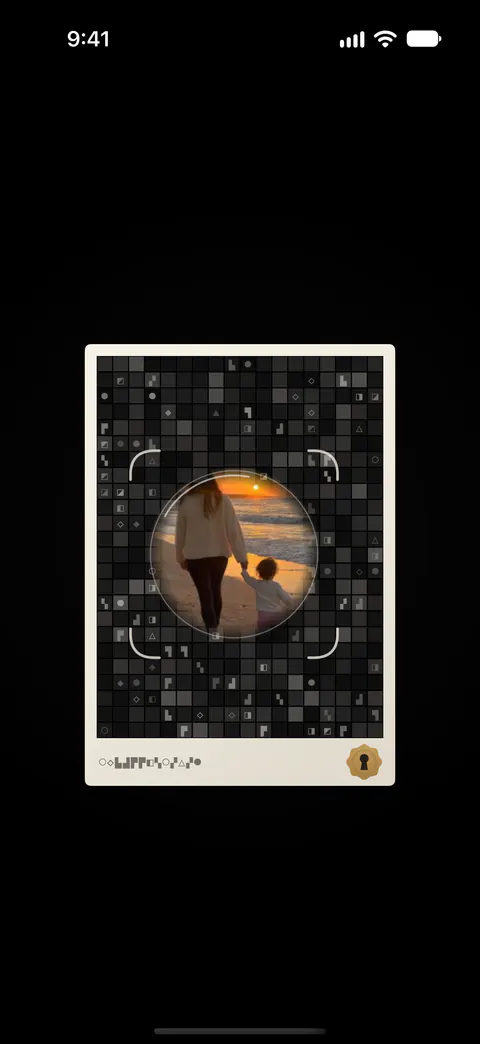
Its backup is encrypted before it leaves the phone, so iCloud stores only ciphertext whatever your iCloud setting. Files, names, notes and record fields are encrypted on your iPhone before they are uploaded, so iCloud receives only ciphertext.
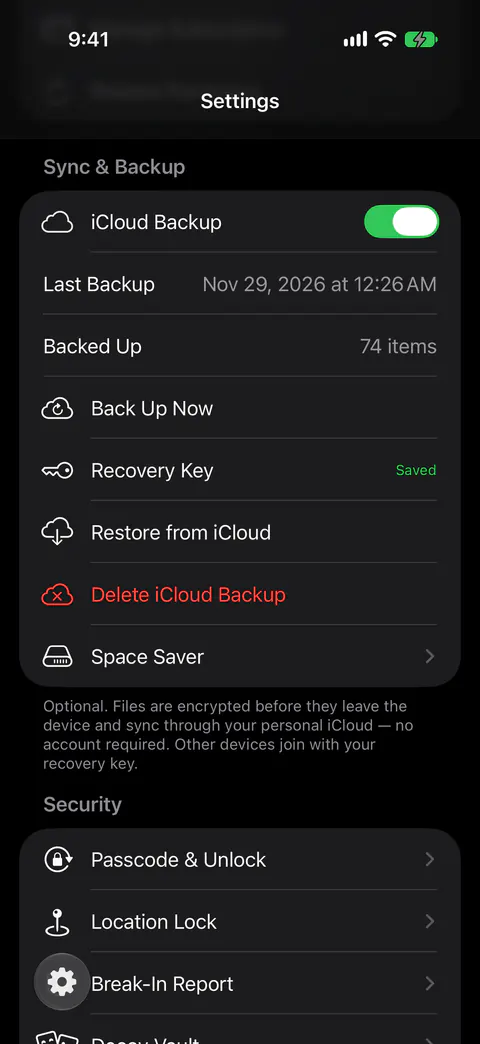
The cost of a key only you hold is the same as with Advanced Data Protection: lose it, and nobody can help. Because your key never reaches us, we cannot recover your vault or reset your passcode for you. The recovery key is the only way to decrypt an iCloud backup on a new iPhone.
Where Sealed helps, and where it doesn’t
It helps when you want chosen photos encrypted with a key of their own, kept on your iPhone and tied to no account. Your vault key is kept in the iPhone Keychain, on this device only, and it can be read only while the phone is unlocked. Sealed has no account, so there is nothing to sign up for.
It helps when you want a backup that iCloud can’t read, without changing your Apple Account settings. Files, names, notes and record fields are encrypted on your iPhone before they are uploaded, so iCloud receives only ciphertext.
It doesn’t change how the rest of your library is stored, or turn on Advanced Data Protection or backup encryption for you.
It doesn’t make the backup invisible to iCloud: its shape still shows. Backup records have plain types such as VaultItem and SecureNote and random identifiers, so iCloud can see that a backup exists and roughly how many records it holds.
It doesn’t protect against someone who can open the vault with your passcode or your face. Your passcode is a gate in front of the app. It is not part of the key. Without Maximum Security, the app can read your vault key whenever the phone is unlocked, because the key sits in the Keychain.
Questions and answers
Are iPhone photos encrypted by default?
On the phone, yes, once a passcode is set. Apple says all data on an iPhone is stored in encrypted form, and that setting a passcode turns on Data Protection. In iCloud they are encrypted too, but with Apple holding the keys unless you turn on Advanced Data Protection. By default, Apple keeps the encryption keys for iCloud Photos, Notes and iCloud Drive in its own data centers so that it can help you recover them, and only the optional Advanced Data Protection makes them end-to-end encrypted.
Can Apple see my iCloud photos?
Under standard data protection Apple holds the keys. Under standard data protection, Apple can decrypt your iCloud data on your behalf, for example when you sign in on a new device or recover your data after forgetting your password. With Advanced Data Protection on, iCloud Photos is end-to-end encrypted and the keys stay on your trusted devices.
Is the Hidden album encrypted separately?
Apple describes it as a locked album, not as separate encryption. Photos you move out of the Library into Apple’s separate locked album stay out of the Library, other albums and the Photos widget, and from iOS 16 that album asks for authentication to open. Even with Advanced Data Protection on, Apple keeps the keys to some Photos metadata, such as each photo’s checksum, whether it is marked as a favorite, set aside or deleted, and how many times it has been viewed.
Are photos in a shared album end-to-end encrypted?
No. Shared Albums in Photos don’t support Advanced Data Protection, so what you share in one is not end-to-end encrypted even when Advanced Data Protection is on.
Is a photo in Sealed encrypted?
Sealed encrypts every file with AES-256-GCM before it is saved. Each file gets its own random 256-bit key, and that key is sealed with your vault key. Your vault key is a random 256-bit key. It is not made from your passcode.
Sources
What this page says about Sealed was checked against the app on .
- Apple Platform Security, Data Protection overview — Photos uses Data Protection by default and each new file gets its own 256-bit key (published August 3, 2026). Read 13 Nov 2026
- Apple Platform Security, Data protection classes — all data on an iPhone is stored encrypted; the classes decide when it can be read. Read 13 Nov 2026
- Apple Platform Security, Passcodes and passwords — setting a passcode turns on Data Protection. Read 13 Nov 2026
- Apple Support, iCloud data security overview (article 102651) — standard data protection and Advanced Data Protection side by side; the Photos metadata that stays under standard protection (published January 5, 2026). Read 13 Nov 2026
- Apple Support, How to turn on Advanced Data Protection for iCloud (article 108756) — requirements, recovery methods and the steps on an iPhone (published April 17, 2026). Read 13 Nov 2026
- Apple Support, the Hidden album in Photos (article 104987) — the album’s lock from iOS 16 (published March 16, 2026). Read 28 Nov 2026
- Apple Support, About encrypted backups on your iPhone (article 108353) — a computer backup isn’t encrypted until you turn on Encrypt local backup (published September 21, 2026). Read 13 Nov 2026
- Sealed on the App Store — the listing for the vault app this page compares with Apple’s settings
Get Sealed
Sealed is free to download, and Sealed Pro is an optional in-app purchase.

Sealed: Private Photo Vault
Sealed is free to download, and Sealed Pro is an optional in-app purchase.