Comparison · Encryption
Encrypted photos on iPhone: three ways to get there, and the apps that say how
Start with what you already have: turn on Advanced Data Protection and iCloud Photos becomes end-to-end encrypted, for free. If you want photos under a code your iPhone passcode doesn’t open, or kept out of the Photos library, choose an on-device vault that names its cipher, keeps the key on your phone and has an encrypted backup. If you want a whole encrypted photo cloud, look at services built for it. Below, each app is described only by what its own pages say, with the date they were read.

On this page
Disclosure. Sealed is made by Loopware LLC. Sealed is one of the apps below. Its row comes from the app’s code and listing. Every other app is described only by what its own pages said on the date given. We tested none of them.
First, the free option: Advanced Data Protection
If your worry is that photos in iCloud could be read by someone other than you, Apple has a switch for that. By default, Apple keeps the encryption keys for iCloud Photos, Notes and iCloud Drive in its own data centers so that it can help you recover them, and only the optional Advanced Data Protection makes them end-to-end encrypted.
- To turn on Advanced Data Protection on an iPhone, open Settings, tap your name, then iCloud, scroll down, tap Advanced Data Protection and then Turn on Advanced Data Protection.
- Before Advanced Data Protection turns on, Apple has you set up at least one recovery method, a recovery contact or a recovery key, because with it on Apple doesn’t have the keys to help you recover your end-to-end encrypted data.
- Check you meet the requirements: Advanced Data Protection needs an Apple Account with two-factor authentication, a passcode or password on your device, and updated software on every device signed in to your account.
What it leaves out: Shared Albums in Photos don’t support Advanced Data Protection, so what you share in one is not end-to-end encrypted even when Advanced Data Protection is on. Even with Advanced Data Protection on, Apple keeps the keys to some Photos metadata, such as each photo’s checksum, whether it is marked as a favorite, set aside or deleted, and how many times it has been viewed. Turning on Advanced Data Protection on one device turns it on for your whole Apple Account.
What it doesn’t change: the photos on the phone still open with the phone. Anyone who knows your iPhone passcode sees them, and so does any app you gave full photo access. That is the gap a vault app fills.
Three kinds of encrypted photo app
| Kind | Encrypts | Opens with | Fits when |
|---|---|---|---|
| iCloud Photos with Advanced Data Protection | Your iCloud copy, end to end | Your iPhone, as always | You want iCloud sealed and nothing new to learn |
| An encrypted cloud service | Files before they upload | The service’s account and password | You want a photo cloud that isn’t Apple’s |
| An on-device vault | Files inside the app | The app’s own code | You want photos under a separate code, off the library |
Encrypted cloud services
- Ente Photos. Its listing says photos and videos are encrypted on your device and then backed up end to end (App Store record, read 13 Nov 2026). Its security FAQ names XChaCha20 and XSalsa20 with Poly1305, and Argon2id for the password (read 13 Nov 2026).
- Proton Drive. Its security page says Drive is end-to-end and zero-access encrypted, file names included (read 13 Nov 2026).
- Cryptomator. Its listing says contents and names are encrypted with AES at a 256-bit key length, the password is secured with scrypt, the app is open source and it has been independently audited (App Store record, read 13 Nov 2026).
For contrast, Google’s Locked Folder help page says the folder opens with the phone’s own Face ID, Touch ID or passcode and uses Google Photos’ standard encryption, with no separate key described (read 13 Nov 2026).
On-device vault apps, by how much they tell you
| App | What its own pages say |
|---|---|
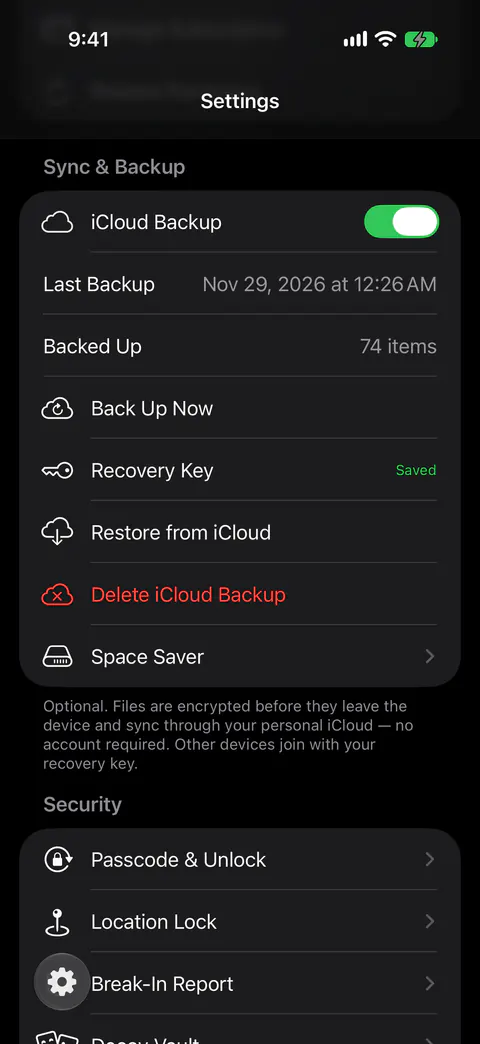
| Sealed | Sealed encrypts every file with AES-256-GCM before it is saved. Each file gets its own random 256-bit key, and that key is sealed with your vault key. Your vault key is a random 256-bit key. It is not made from your passcode. Files, names, notes and record fields are encrypted on your iPhone before they are uploaded, so iCloud receives only ciphertext. |
| Obscura | Its listing names AES-256-GCM and says there are no accounts and that the encryption code is open source; its home page names 600,000 rounds of PBKDF2 for the key. Store record, 13 Nov 2026. |
| Inner Gallery | Its listing names ChaCha20-Poly1305; a blog post says each PIN derives its key on the device and no PIN recovery exists. Store record, 13 Nov 2026. |
| Vaultaire | Its listing names AES-256-GCM; its site says a pattern and PBKDF2 unwrap a random master key. Store record, 13 Nov 2026. |
| Encamera | Its privacy policy names AES-256 with keys in the Keychain; a blog post names XChaCha20-Poly1305 and an Argon2 key phrase instead. Both read 13 Nov 2026. |
| LockMyPix | Its listing names AES in CTR mode for photos, videos, documents and notes. Store record, 13 Nov 2026. |
| Keepsafe | Its help center names 256-bit AES at rest, and another article says it is not designed as a completely zero-knowledge app. Both 13 Nov 2026. |
| Private Photo Vault | Its FAQ names AES-256 (28 Oct 2026); its listing uses “encrypted” only for the Cloud Vault backup (store record, 13 Nov 2026). |
| PV, Secret Photo Album - SA, 1Locker | Each listing uses the word encryption and names no cipher (PV, SA, 1Locker, 13 Nov 2026). |
| SPV, Safe Lock, Unlock | Read in full, the listing does not use the word encrypt (SPV, Safe Lock, Unlock, 13 Nov 2026). |
An app that says little may still encrypt well. It just gives you nothing to hold it to.
How to choose, in four questions
- Is the cipher named for the files themselves? Not just for a backup.
- Who holds the key? A key made on your phone, or one an account can reset.
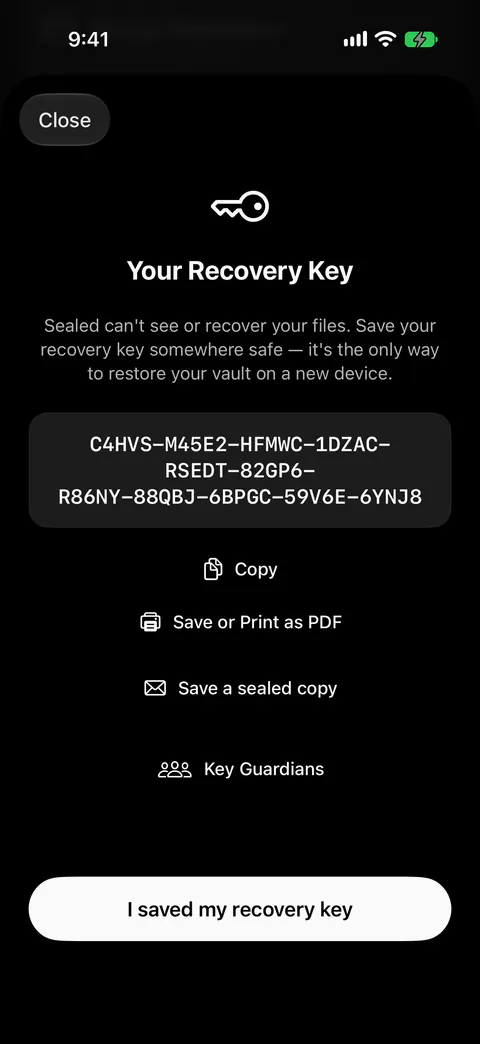
- Is there a way back you control? A recovery key or phrase, kept by you.
- Is the backup encrypted before upload? And does it restore on a new phone?
Where Sealed helps, and where it doesn’t
It helps if you want a code apart from your iPhone passcode, with the cipher and the key described. Sealed has a passcode of its own, a gate inside the app that is separate from your iPhone passcode. Your vault key never reaches us.
It helps if you want files checked for tampering. Large files are encrypted in chunks, and Sealed refuses a file that has been changed, reordered or cut short.
It helps if you want the key tied to a live face. Maximum Security seals your vault key to a Secure Enclave key that can be used only after a live Face ID or Touch ID match. Maximum Security is part of Sealed Pro.
It doesn’t keep the key from the app while the phone is unlocked, unless Maximum Security is on. Without Maximum Security, the app can read your vault key whenever the phone is unlocked, because the key sits in the Keychain.
It doesn’t come with an outside audit. Sealed has not had an independent security audit.
It doesn’t run on a computer or the web. Sealed runs on iPhone and iPad.
Questions and answers
Are iPhone photos already encrypted?
On the phone, yes: Apple says all data on an iPhone is stored in encrypted form, and that setting a passcode turns on Data Protection. In iCloud it depends on a setting. By default, Apple keeps the encryption keys for iCloud Photos, Notes and iCloud Drive in its own data centers so that it can help you recover them, and only the optional Advanced Data Protection makes them end-to-end encrypted.
Does Advanced Data Protection encrypt everything in Photos?
Not quite. Shared Albums in Photos don’t support Advanced Data Protection, so what you share in one is not end-to-end encrypted even when Advanced Data Protection is on. Even with Advanced Data Protection on, Apple keeps the keys to some Photos metadata, such as each photo’s checksum, whether it is marked as a favorite, set aside or deleted, and how many times it has been viewed.
Is a named cipher enough to trust an app?
It is a start, not proof. A named cipher says nothing about where the key is kept or what it is made from. In Sealed: Your vault key is a random 256-bit key. It is not made from your passcode. Your vault key is kept in the iPhone Keychain, on this device only, and it can be read only while the phone is unlocked. Without Maximum Security, the app can read your vault key whenever the phone is unlocked, because the key sits in the Keychain.
What happens if I lose the key to an encrypted photo app?
With a design where only you hold the key, the developer can’t let you back in. That is the trade. In Sealed: Because your key never reaches us, we cannot recover your vault or reset your passcode for you. The recovery key is the only way to decrypt an iCloud backup on a new iPhone.
Sources
What this page says about Sealed was checked against the app on .
- Apple Support, iCloud data security overview (article 102651) — who holds the keys for iCloud Photos under standard data protection and Advanced Data Protection; read 13 Nov 2026
- Apple Support, How to turn on Advanced Data Protection for iCloud (article 108756) — the steps, the recovery method and the requirements; cited through the ios.adp facts
- Ente Photos, Apple Lookup record (US) — encrypted on the device, then backed up end to end; read 13 Nov 2026
- Ente, Security and Privacy FAQ — the algorithms named and keys derived from the password; read 13 Nov 2026
- Proton Drive, security page — end-to-end and zero-access encryption, file names included; read 13 Nov 2026
- Cryptomator, Apple Lookup record (US) — AES at 256 bits for contents and names, scrypt, open source, independently audited; read 13 Nov 2026
- Google Photos Help, Locked Folder (iPhone & iPad) — opens with the phone’s own unlock, uses Google Photos' standard encryption; read 13 Nov 2026
- Obscura, Apple Lookup record (US) — AES-256-GCM, no accounts, open source encryption code; read 13 Nov 2026
- Obscura, home page — a key derived with 600,000 rounds of PBKDF2; read 13 Nov 2026
- Inner Gallery, Apple Lookup record (US) — ChaCha20-Poly1305 named; read 13 Nov 2026
- Inner Gallery, Why Inner Gallery Works Without a Server — the PIN derives the key on the device and there is no PIN recovery; read 13 Nov 2026
- Vaultaire, Apple Lookup record (US) — AES-256-GCM named; read 13 Nov 2026
- Vaultaire, home page — a pattern and PBKDF2 unwrap a random master key; read 13 Nov 2026
- Encamera, privacy policy — AES-256, keys in the device’s Keychain; read 13 Nov 2026
- Encamera, Back Up Your Key Phrase — a ten-word phrase, Argon2, XChaCha20-Poly1305; read 13 Nov 2026
- LockMyPix, Apple Lookup record (US) — AES in CTR mode named; read 13 Nov 2026
- Keepsafe Support, How does Keepsafe protect my data? — 256-bit AES, encrypted at rest; read 13 Nov 2026
- Keepsafe Support, Can Keepsafe see any of my content? — not designed as a completely zero-knowledge app; read 13 Nov 2026
- Private Photo Vault, FAQ — AES-256 named; read 28 Oct 2026
- Private Photo Vault, Apple Lookup record (US) — encrypted used only for the Cloud Vault backup; read 13 Nov 2026
- PV, Secret Photo Album - SA and 1Locker, Apple Lookup records (US) — the word encryption with no cipher; the SA (id 1174964304) and 1Locker (id 1462756877) records read the same day, 13 Nov 2026
- SPV, Safe Lock and Unlock, Apple Lookup records (US) — the listing text does not use the word encrypt; Safe Lock (id 1195429570) and Unlock (id 1254051789) read the same day, 13 Nov 2026
- Sealed on the App Store — the listing for the app this site is about
Get Sealed
Sealed is free to download, and Sealed Pro is an optional in-app purchase.

Sealed: Private Photo Vault
Sealed is free to download, and Sealed Pro is an optional in-app purchase.