Guide · Choosing a vault
Is a photo vault app safe? What to check, and how to test it
A good one is, but the word vault proves nothing. The risks are a code screen over unencrypted files, an account or server that can open your photos, and losing everything with the phone or a forgotten code. Before installing, check that the app names its encryption, keeps the key on your phone, needs no account and has an encrypted backup with a recovery key. Then test it with a few photos before moving the rest. If Apple’s free options are enough, you need no vault at all.

On this page
What can actually go wrong
Most worries about vault apps fall into five risks. Some come from bad apps; some come from any app, good or bad, used without a backup.
| Risk | What it looks like | What to look for |
|---|---|---|
| A lock with nothing behind it | A passcode screen in front of ordinary photo files | The files themselves encrypted, and the cipher named |
| Someone else holds the key | An account, an email reset, a company server | A key made and kept on your phone |
| The phone goes, the photos go | No backup, or a backup in plain form | An encrypted backup and a way to restore it |
| You lock yourself out | A forgotten code with no way back | A recovery key you keep, not a reset by email |
| The app watches you | Ads and tracking in an app that holds your photos | No ads, no trackers, a short privacy label |
The first risk is the one people miss. A code screen decides who can use the app; encryption decides whether the stored files mean anything to someone who gets past it, or copies them off the phone.
Do you need a vault at all?
Apple’s free tools cover a lot, and they are already on your iPhone:
- The Hidden album in Photos. From iOS 16, Photos keeps its album for set-aside photos, and Recently Deleted, locked by default: they open with Face ID, Touch ID or your iPhone passcode. Your iPhone passcode opens it, and it holds photos and videos only.
- Lock an app. To lock an app, touch and hold it on the Home Screen and tap Require Face ID, Touch ID or Passcode, and it locks again each time you quit it. A locked app is locked only on that iPhone, and its locked status doesn’t sync with iCloud.
- Locked notes. In Notes you can lock a note with your iPhone passcode or with a password only for Notes, and Apple says both options use end-to-end encryption for iCloud accounts. Apple says you can’t lock a note that has tags, PDFs, audio, video, or Keynote, Pages or Numbers documents, or a note that you share with someone else.
A vault earns its place when you want a code separate from your iPhone passcode, photos kept out of the library that other apps can be given access to, or documents and records kept beside the pictures. The Hidden album vs a photo vault page sets the two side by side.
A checklist to read before you install
Use the App Store page, the developer’s website and its help pages. Tick what the developer states in writing:
- The cipher is named for the files in the vault, not only for a cloud backup. “Encrypted” alone is a claim you can’t check; a cipher such as GCM is defined in public, for example in NIST SP 800-38D.
- The key stays on your phone. Look for what happens if you forget the code. A reset by email means someone other than you can open the way in.
- No account is needed, or you understand exactly what the account can reach.
- The backup is encrypted before it leaves the phone, and there is a recovery key or password that restores it on a new phone.
- The privacy label is short. Apple says that section is reported by the developer, so read it as the developer’s own statement.
- The app is maintained. Check the version history for recent updates.
If a listing gives you nothing to tick, it may still be a fine app, but it has asked you to take it on trust. The encrypted photo apps compared page shows how much several apps say.
A test to run before you move everything
- Put three or four photos you can afford to lose into the vault.
- Turn on its backup, and write down the recovery key or password it gives you.
- Type a wrong code a few times and see what the app does.
- Find where the backup status is shown and check it says the photos are backed up.
- Only then move the rest, and keep the originals until the backup says it is done.
How Sealed answers the checklist
- Encryption: Sealed encrypts every file with AES-256-GCM before it is saved. Each file gets its own random 256-bit key, and that key is sealed with your vault key. Names, notes and the fields of a record are sealed with your vault key too, not just the photos.
- The key: Your vault key is a random 256-bit key. It is not made from your passcode. Your vault key is kept in the iPhone Keychain, on this device only, and it can be read only while the phone is unlocked. Your vault key never reaches us.
- Account: Sealed has no account, so there is nothing to sign up for. We run no server, so there is nothing of yours for us to see.
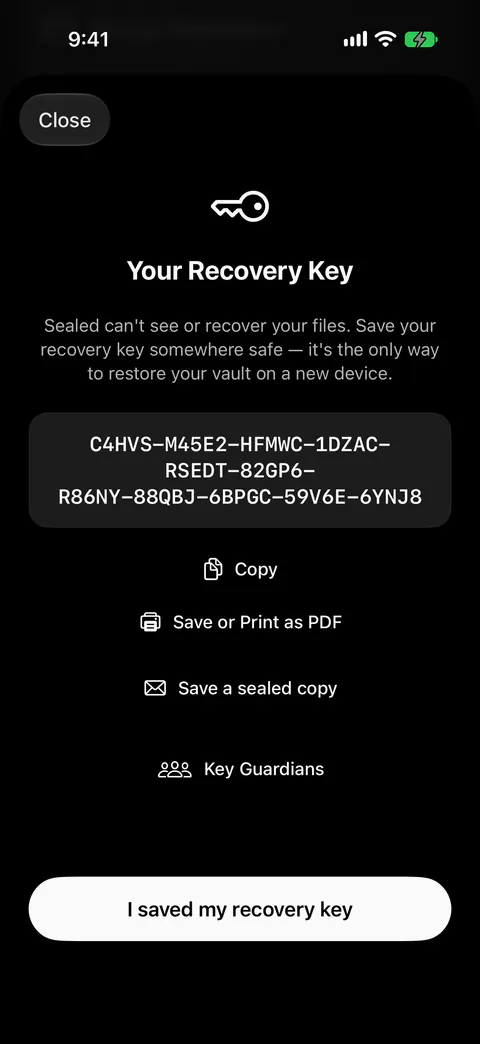
- Backup: Backup goes to your own iCloud account, not to a server of ours. Files, names, notes and record fields are encrypted on your iPhone before they are uploaded, so iCloud receives only ciphertext. The recovery key is the only way to decrypt an iCloud backup on a new iPhone.
- Tracking: Sealed contains no analytics or tracking SDKs, and it collects no data.
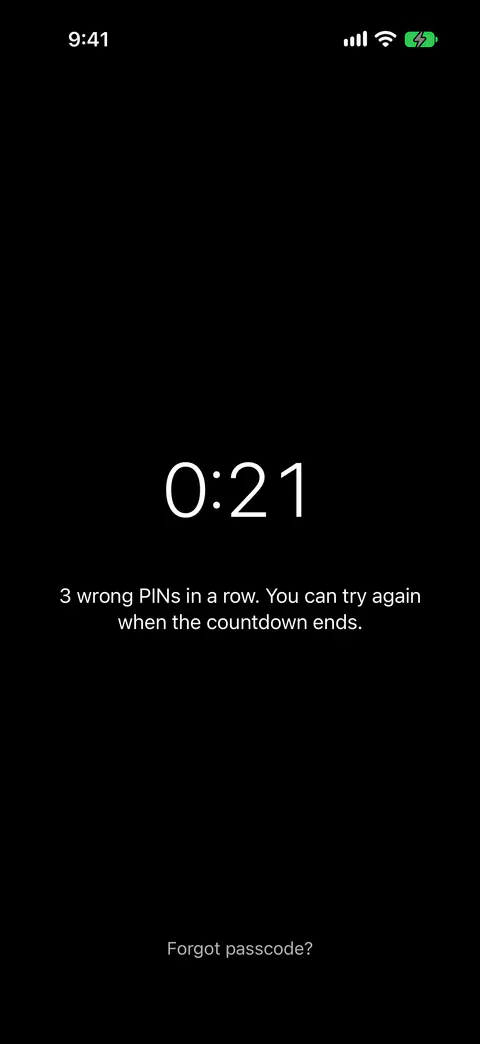
- Guessing: By default, after three wrong passcodes in a row Sealed locks entry for 30 seconds, then for 1, 5, 15 and finally 60 minutes after each further wrong try. During a wait Sealed refuses every way in, the right passcode and Face ID included, and doesn’t count those tries as wrong.
The security page and how Sealed protects your photos go into the design in more detail.
Where Sealed helps, and where it doesn’t
It helps by putting each answer to the checklist in writing, drawn from the app’s code and its listing. Sealed encrypts every file with AES-256-GCM before it is saved. Sealed has no account, so there is nothing to sign up for.
It helps if you forget your passcode but kept your recovery key. If you forget your passcode, your recovery key lets you set a new one.
It doesn’t protect a photo once it leaves the vault. Your files never leave your iPhone unless you turn on iCloud backup or export them yourself. The original in Photos, a photo sent in a chat and anything you export are outside it.
It doesn’t keep the key from the app while the phone is unlocked, unless you turn on Maximum Security. Without Maximum Security, the app can read your vault key whenever the phone is unlocked, because the key sits in the Keychain. Maximum Security seals your vault key to a Secure Enclave key that can be used only after a live Face ID or Touch ID match.
It can’t let you back in without your passcode or your recovery key. Because your key never reaches us, we cannot recover your vault or reset your passcode for you.
It hasn’t been checked by an outside auditor. Sealed has not had an independent security audit.
Questions and answers
Can a photo vault app see my photos?
It depends on where the key is. If the developer runs a server or an account that can reset your access, it may be able to. Sealed has neither. Sealed has no account, so there is nothing to sign up for. Your vault key never reaches us. Because your key never reaches us, we cannot recover your vault or reset your passcode for you.
What happens to my photos if I delete the vault app?
In most vaults, the files on the phone go with the app, so only a backup brings them back. In Sealed: If you delete Sealed from an iPhone while iCloud Backup is off, the vault on that iPhone is deleted with it. Deleting the app doesn’t delete your iCloud backup: Delete iCloud Backup in Settings does.
Can someone open a vault app by guessing the code?
A short code can be guessed if the app lets someone keep trying. Look for a growing wait after wrong tries. By default, after three wrong passcodes in a row Sealed locks entry for 30 seconds, then for 1, 5, 15 and finally 60 minutes after each further wrong try. Sealed keeps the wrong-try count and the wait when you close it and open it again, and the count clears only after a correct unlock or a passcode reset with your recovery key.
Is Sealed safe?
No app can promise that in every case, and Sealed’s design is written down so you can judge it. Sealed encrypts every file with AES-256-GCM before it is saved. Your vault key is kept in the iPhone Keychain, on this device only, and it can be read only while the phone is unlocked. We run no server, so there is nothing of yours for us to see. Sealed has not had an independent security audit.
Sources
What this page says about Sealed was checked against the app on .
- Apple Support, About privacy information on the App Store — the privacy information on an app’s page is reported by the developer. Read 28 Nov 2026
- Apple iPhone User Guide, lock an app on iPhone — requiring Face ID, Touch ID or the passcode to open an app; cited through the ios.lock_app facts
- Apple Support, Lock notes on your iPhone or iPad (article 102537) — the two ways to lock a note, their encryption and their limits; cited through the ios.notes_lock facts
- Apple Support, the Hidden album in Photos (article 104987) — published March 16, 2026; the album is locked by default from iOS 16. Read 28 Nov 2026
- NIST SP 800-38D, Galois/Counter Mode — defines GCM, a mode for authenticated encryption, which detects changes to the data as well as scrambling it
- Sealed on the App Store — the listing for the app used as the worked example
Get Sealed
Sealed is free to download, and Sealed Pro is an optional in-app purchase.

Sealed: Private Photo Vault
Sealed is free to download, and Sealed Pro is an optional in-app purchase.