Comparison · Choosing a vault
The Hidden album or a vault app: which one does your job
The Hidden album is enough when you want photos off the grid and out of the widget, and nothing new to install or remember. It opens with Face ID, Touch ID or your iPhone passcode, and the photos stay in your Photos library. A vault app is for when the iPhone passcode must not open them, when apps with full photo access should not reach them, or when documents and notes belong beside them. A vault costs you a second code and a recovery key to keep.

On this page
The short version
| Hidden album in Photos | A vault app such as Sealed | |
|---|---|---|
| Cost | Free, already installed | Sealed is free to download, and Sealed Pro is an optional in-app purchase. |
| Opens with | Face ID, Touch ID or your iPhone passcode | Sealed has a passcode of its own, a gate inside the app that is separate from your iPhone passcode. |
| Where the photos live | In your Photos library | Your files never leave your iPhone unless you turn on iCloud backup or export them yourself. |
| Encrypted by the app itself | Not separately: protected like the rest of the library | Sealed encrypts every file with AES-256-GCM before it is saved. |
| Apps with full photo access | Can reach them | Sealed saves items to your photo library only when you export them. |
| Your other Apple devices | Follow along with iCloud Photos | Other devices join your backup with your recovery key. |
| If you forget the code | Your iPhone unlock is the code | If you forget your passcode, your recovery key lets you set a new one. |
| What it holds | Photos and videos | On the free plan you can add photos. Videos, documents, notes and records need Sealed Pro. |
The rest of this page explains each row and ends with what to do in either case.
Set up the Hidden album properly
If the album is the right tool, make sure it is working as intended. From Apple’s guide and Apple Support:
- Move photos in. In Photos, tap Select, tap the photos, tap the More button, then tap Hide.
- Check the lock is on. The Hidden album and Recently Deleted are locked by default, and turning off Use Face ID, Use Touch ID or Use Passcode in Settings, under Apps, then Photos, takes that lock away.
- Decide whether the album should show at all. On iPhone the Hidden album is shown by default, and turning off Show Hidden Album in Settings, under Apps, then Photos, means the photos in it aren’t visible in Photos.
- Know where it is. In Photos on iPhone, the Hidden album is under Collections, below Utilities, and it opens when you tap View Album and unlock.
- Remember your other devices. If you use iCloud Photos, a photo you move into that locked album is moved out of the Library on your other devices too. On iCloud.com, the Hidden album is in the Photos sidebar, and its photos appear once you select it and click the button that shows them.
What each one keeps out
Someone scrolling your camera roll. Both work. Photos you move out of the Library into Apple’s separate locked album stay out of the Library, other albums and the Photos widget, and from iOS 16 that album asks for authentication to open.
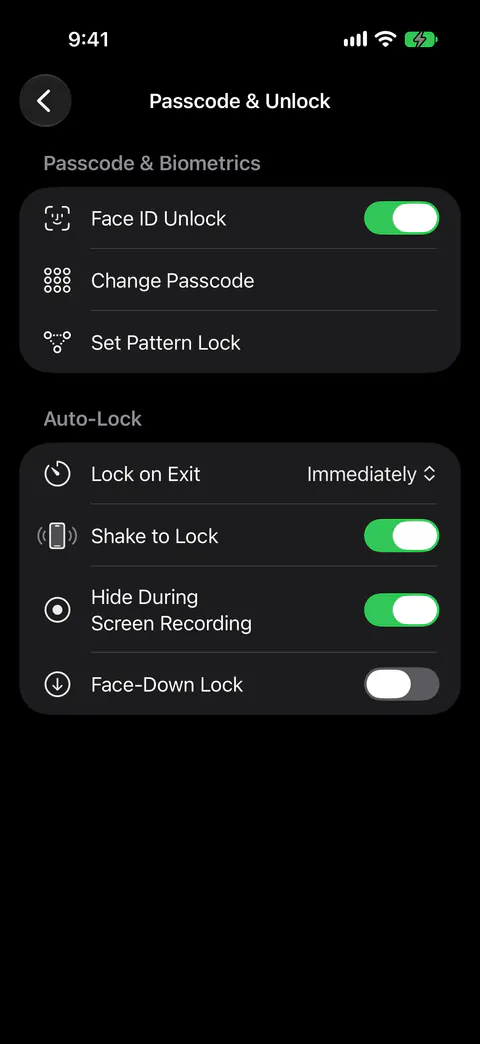
Someone who knows your iPhone passcode. The album lets them in. A vault keeps them out only if its own code is what opens it. If you turn on Face ID for the vault, iOS’s standard check lets the iPhone passcode stand in for your face. With plain Face ID unlock on, someone who knows your iPhone passcode can open Sealed through the Face ID prompt. Sealed’s answer is Dual Lock. Dual Lock asks for your passcode and a Face ID match together, and it is part of Sealed Pro. Dual Lock’s second step takes Face ID or Touch ID only: your iPhone passcode can’t stand in for it, so one watched passcode can’t do both halves.
Apps you gave full photo access. Apple says that giving an app full access to your photos grants it your photos and videos, including the ones in the Hidden album even if that album is locked. A vault’s copy sits outside the library those apps read, but the original stays in Photos until you delete it. Until you delete them, the originals stay in Photos, outside the vault.
A person who makes you open your phone. Neither stops that fully. A vault can offer a second, harmless vault to show. A decoy vault opens with a second passcode, and it is part of Sealed Pro. See the decoy vault.
Losing the phone. With iCloud Photos on, the album is in iCloud with the rest of your library. A vault needs its own backup. Files, names, notes and record fields are encrypted on your iPhone before they are uploaded, so iCloud receives only ciphertext. Encrypted iCloud backup is free.
What a vault asks of you in return
- A second code to remember, and a recovery key to keep somewhere safe. Because your key never reaches us, we cannot recover your vault or reset your passcode for you.
- A second copy for a while. Importing copies; you then delete the originals and empty Recently Deleted. Moving photos into a vault app walks through it.
- Fewer devices. Sealed runs on iPhone and iPad. The album follows you to every Apple device you own.
When the album is the better choice
Pick the album if your worry is a glance over your shoulder, if the people around you don’t know your iPhone passcode, and if you want the photos on your iPad and Mac without doing anything. It costs nothing, can’t be lost to a forgotten code, and keeps one copy of each photo.
Pick a vault if the passcode is shared or watched, if you have given photo apps full access, or if you want passports, card numbers and notes kept in the same place as the pictures.
Where Sealed helps, and where it doesn’t
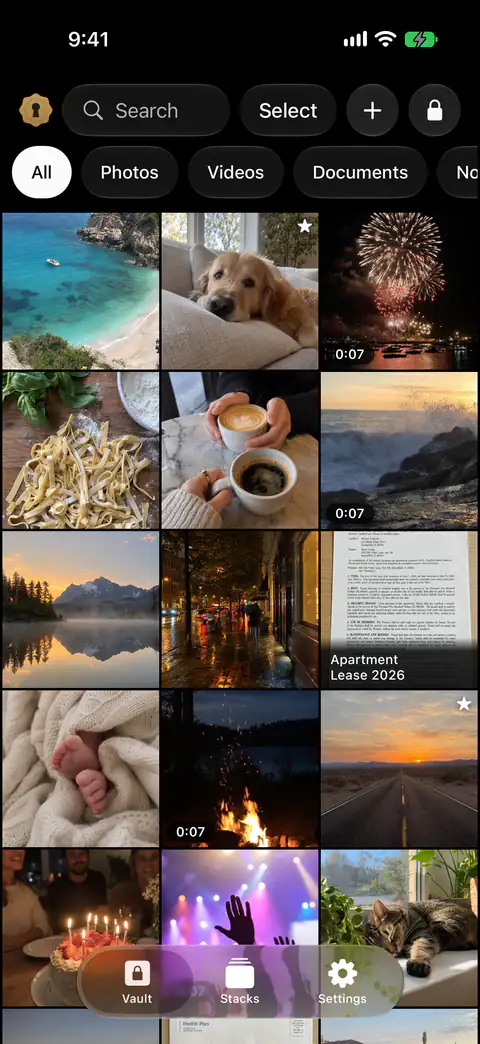
It helps when the photos need a code of their own, apart from your iPhone passcode. Sealed has a passcode of its own, a gate inside the app that is separate from your iPhone passcode.
It helps when documents, notes and records belong with them. Records keep logins, 2FA codes, credit cards, bank accounts, IDs and passports, Wi-Fi networks, recovery codes, license keys, contacts and custom fields.
It doesn’t shut out your iPhone passcode while plain Face ID unlock is on. With plain Face ID unlock on, someone who knows your iPhone passcode can open Sealed through the Face ID prompt.
It doesn’t remove the originals unless you ask it to. Until you delete them, the originals stay in Photos, outside the vault.
It doesn’t hold videos, documents, notes or records on the free plan. On the free plan you can add photos. Videos, documents, notes and records need Sealed Pro.
It doesn’t run on a Mac or the web. Sealed runs on iPhone and iPad.
Questions and answers
Can someone who knows my iPhone passcode open the Hidden album?
Yes. Apple’s guide lists Face ID, Touch ID or your passcode as the ways to unlock it. From iOS 16, Photos keeps its album for set-aside photos, and Recently Deleted, locked by default: they open with Face ID, Touch ID or your iPhone passcode.
Can other apps see photos in the Hidden album?
Apple says that giving an app full access to your photos grants it your photos and videos, including the ones in the Hidden album even if that album is locked. Giving an app limited access instead keeps it to the photos you pick. Apple’s Limited Photos Library lets you choose which photos and videos an app can access.
Is the Hidden album encrypted?
It is part of your Photos library, which is protected like the rest of the iPhone’s data. Apple says all data on an iPhone is stored in encrypted form, and that setting a passcode turns on Data Protection. In iCloud: By default, Apple keeps the encryption keys for iCloud Photos, Notes and iCloud Drive in its own data centers so that it can help you recover them, and only the optional Advanced Data Protection makes them end-to-end encrypted.
Does the Hidden album show up on my Mac and on iCloud.com?
On a Mac the Hidden album is off by default: you choose View, then Show Hidden Photo Album, and unlock it with Touch ID or your login password. On iCloud.com, the Hidden album is in the Photos sidebar, and its photos appear once you select it and click the button that shows them.
Sources
What this page says about Sealed was checked against the app on .
- Apple Support, the Hidden album in Photos (article 104987) — published March 16, 2026; moving photos to the album, the lock from iOS 16, iCloud Photos, Show Hidden Album, the Mac. Read 28 Nov 2026
- Apple iPhone User Guide, delete photos and videos or move them out of the Library — the album below Utilities, View Album, the Use Face ID / Use Touch ID / Use Passcode switch in Settings, Apps, Photos. Read 28 Nov 2026
- Apple Support, If you’re missing photos or videos in the Photos app (article 118558) — published April 29, 2026; the album on iCloud.com; cited through the ios.web_album fact
- Apple Legal, Photos & Privacy — full photo access gives an app the album’s photos even while it is locked; cited through the ios.full_access_locked_album fact
- Sealed on the App Store — the listing, including the plans and the privacy label
Get Sealed
Sealed is free to download, and Sealed Pro is an optional in-app purchase.

Sealed: Private Photo Vault
Sealed is free to download, and Sealed Pro is an optional in-app purchase.